Project work
Lucent (a technical breakdown of) my AI Assistant
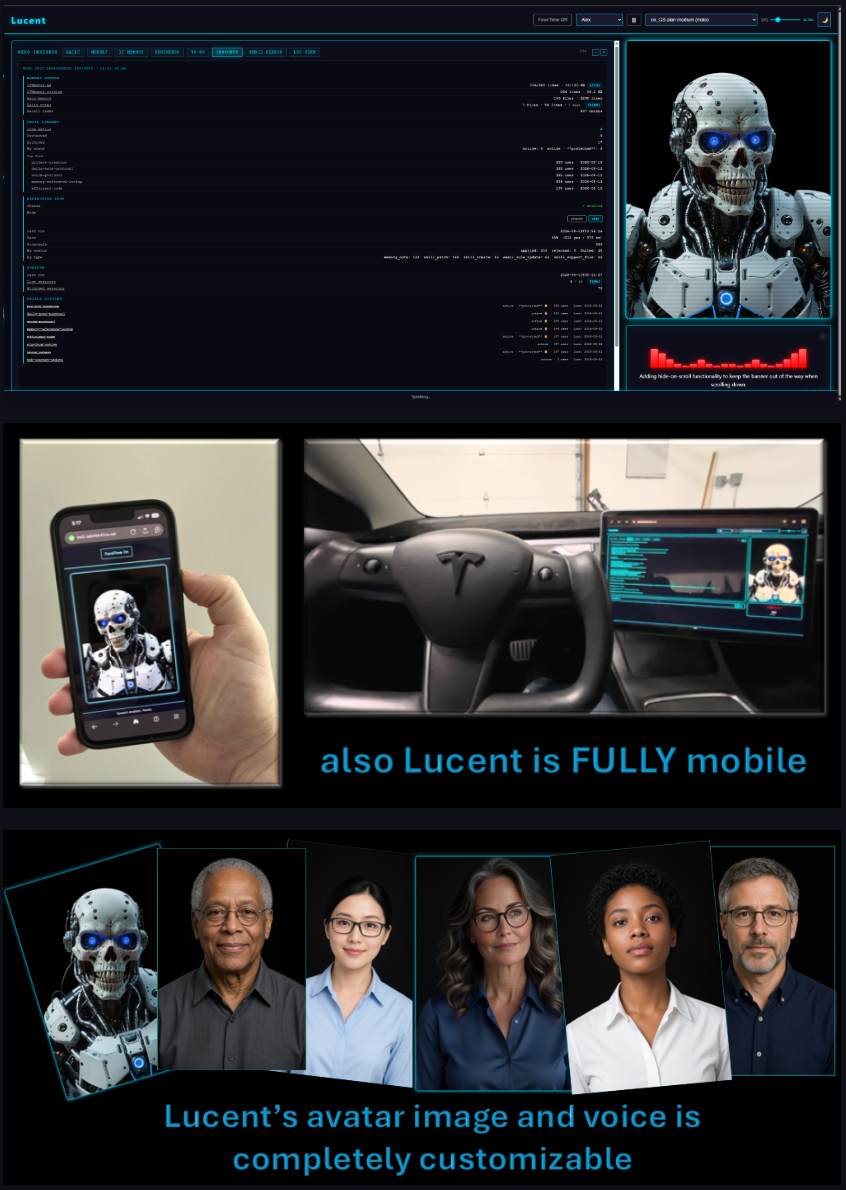
Lucent
Watch (mobile) Lucent in action
Lucent is my personal AI assistant framework built on persistent memory that runs anywhere.
This article here is designed as a technical deep dive on the details. I'm going to be writing an overview of his capabilities and functions from a user perspective later. It's premature at the moment because I'm still adding features and functionality on a daily and weekly cadence.
Lucent maintains continuity across sessions through a curated system of identity files, long-term memory, and daily notes so your AI assistant remembers who you are, what matters, and what happened last time. Completely vendor agnostic, Lucent integrates with Claude Code, OpenCode, Ollama, AWS Bedrock, and works seamlessly on local hardware or cloud-based systems — powered by free open-source models or frontier high-end AI engines, running simultaneously across multiple platforms.
How It Works
+-------------+       reads        +-----------+
|  Claude     | ──────────────────> |  Memory   |
|  Code /     |                     |  Files    |
|  OpenCode   | <───────────────── | (.md)     |
|  Agent      |       writes        +-----------+
+-------------+                    ^
        |                          |  reads
        v                          |
+-------------+       writes       +-----------+
|  Daily     | ──────────────────> |  LTMemory  |
|  Notes     |                     |  (distilled)
+-------------+       promotes ──> |  knowledge |
                                   +-----------+
Lucent is a personal AI assistant framework with a private GitHub repository as the single source of truth.
Recovering or deploying from scratch? See docs/DEPLOYMENT.md for the complete step-by-step guide — covers both repos, all services, cron jobs, shell config, Claude Code, Ollama, and OpenCode.
Key Features
Voice Feedback (Voice Box + NX Vox)
The Voice Box web UI (port 8001) provides voice acknowledgment for every interaction. When an agent receives input from Nick, it sends a voice confirmation via the /speak endpoint. This ensures Nick always knows the system received his input, even when away from keyboard.
- Server:
ui/server.py(FastAPI, port 8001) - Startup: managed by
lucent-voice-box.service(systemd) - Voice Send:
curl -X POST http://localhost:8001/speak -H "Content-Type: application/json" -d '{"text": "message"}'
NX Vox — Neural TTS Engine
As of 2026-05-14, the Voice Box uses Piper TTS for server-side neural speech synthesis. This replaces the browser's built-in window.speechSynthesis (which used the OS-native engine — robotic espeak-ng on Linux).
- Engine: Piper TTS (OHF-Voice, GPL-3.0, v1.4.2)
- Integration: In-process Python library — no separate service, no cloud dependency, no API key
- Audio delivery: Base64-encoded WAV over the existing SSE pipeline
- Default voice:
en_GB-cori-high(Southern British female, high quality) - Voice model directory:
ui/voices/(git-ignored — must be downloaded per machine) - Full voice guide: docs/VOICES.md
Voice API endpoints:
| Endpoint | Method | Description |
|---|---|---|
| /vox/voices | GET | List installed voices and current active voice |
| /vox/voice | POST | Switch active voice model ({"voice": "en_GB-alan-medium"}) |
| /vox/status | GET | Runtime stats: synthesis count, latency, uptime |
| /vox/speak | POST | Synthesize audio and return WAV directly (no SSE broadcast) |
| /vox/config | GET | Read avatar→voice mapping |
| /vox/config | POST | Update a voice assignment ({"avatar": "Emma", "voice": "en_GB-jenny_dioco-medium"}) |
Installed voices (2026-05-14):
| Voice | Gender | Quality | Default for |
|---|---|---|---|
| en_GB-cori-high | Female | High | Lucent, Karen |
| en_GB-jenny_dioco-medium | Female | Medium | Emma |
| en_GB-alan-medium | Male | Medium | Alex |
| en_GB-northern_english_male-medium | Male | Medium | (available) |
Per-avatar voice assignment is configured in ui/voice_config.json. Switching the avatar in the UI automatically switches the active Piper voice on the server. See docs/VOICES.md for the complete guide to browsing, downloading, and assigning voices.
Features:
- Multi-Client Broadcasting: When multiple browsers have the Voice Box open, all instances receive and speak messages simultaneously via Server-Sent Events (SSE). No more "only one browser speaks" limitation.
- Voice Mute Option: Select "None (muted)" from the voice dropdown to see visualizations (scanner animation, avatar animation) without audio output. Useful for presentations or silent monitoring. Selection persists across sessions.
- Dynamic Refresh Timer: The daily log displays a countdown timer (left of font controls) showing seconds until the next automatic refresh. Counts down from 30 to 0, resets on each cycle. Styled subtly to avoid visual clutter.
- Daily Log Tabs: Switch between Daily (live), Weekly insights, and Long-term memory views
- Long-term Memory Tab: Displays
memory/LTMemory.md— distilled knowledge and priorities - Daily Tab: Live view of today's session notes (
memory/YYYY-MM-DD.md)
- Long-term Memory Tab: Displays
- Font Controls: Adjust daily log text size with +/− buttons
To-Do List System
The Voice Box UI includes a full-featured To-Do list tab for tracking projects, ambitions, and tasks with priority, tags, search, and cryo scheduling.
Storage: memory/TODO.json (private — gitignored from Lucent repo, backed up to LucentMemory)
Schema: Each item stores id, title, description, priority (H/M/L/null), tags[], status (open/done/archived/cryo), created, updated, notes, cryo_until.
UI Tab (To-Do):
- Search bar, priority filter (All / H / M / L / —), status filter (Open / Cryo / Done / Archived), tag filter
- Inline add form: title, description, priority, tags, cryo date
- Inline editing with save/cancel per item
- Priority badges (red=H, orange=M, green=L) and cryo status badges with pulsing animation for thawed items
Cryo Status: Items frozen until a future date. status=cryo + cryo_until hides items from Open view. On or after the cryo date, items auto-thaw and appear with a pulsing ice-blue "thawed" badge. Useful for ideas to revisit after a specific date or event.
CRUD Endpoints:
| Method | Endpoint | Description |
|--------|----------|-------------|
| GET | /api/todo | List items (filter by status, priority, tags, search; cryo auto-thaw in open view) |
| POST | /api/todo | Create item (status=cryo auto-set when cryo_until is provided) |
| PUT | /api/todo/{id} | Update any fields; setting/clearing cryo_until auto-manages status |
| DELETE | /api/todo/{id} | Hard delete from JSON |
NERO Integration:
scripts/memory_index.pyindexes open/thawed TODO items as semantic chunks; re-indexes automatically on TODO.json change (mtime fingerprint)scripts/todo_context.pyfires in the UserPromptSubmit hook; when the prompt contains project/task/idea keywords, injects the sorted open TODO list into the per-turn context
FaceTime Mode
FaceTime mode optimizes the Voice Box for mobile and video conferencing use. Press Ctrl+Shift+F (or click the FaceTime button) to toggle.
Features:
- Full-Screen Avatar: Hides the log panel and side controls, displaying only the avatar character in the center
- Mobile Responsive: On phones (≤600px width), the header collapses to show only the FaceTime toggle button, maximizing screen real estate
- Portrait & Landscape Support: Avatar scales properly on both orientations; in portrait mode, the avatar expands to fill all available vertical space
- Always Visible Toggle: The FaceTime on/off button remains accessible even in the minimal header on narrow screens
On the go: Pair this with [Discord Integration] — reachable from Discord's mobile app and any other Discord-supported platform — and the publicly exposed (MFA-protected) Voice Box UI. Together they mean you can pull up Lucent from a phone or tablet and drop into FaceTime mode for a face-to-face-style check-in wherever you are, with the same encryption and MFA gate in front of it as the rest of the deployment.
Backup Status Monitoring
The Voice Box popup includes real-time backup health monitoring. When you mouseover the voice panel, a popup displays the last push times for both your Lucent codebase and memory repository with visual status indicators.
Features:
- Three-State Indicator Dots: Color-coded status for each repository
- 🟢 Green dot: Fresh backup (< 2 hours old) — text displays in cyan
- 🟡 Yellow dot: Warning state (2-4 hours old) — text displays in cyan (still operational)
- 🔴 Red dot: Critical state (> 4 hours old) — text displays in grey (unhealthy)
- Formatted Time Display: Shows last push time in format
HH:MM today/yesterday (Xh ago) - Repository Labels:
Lucent Core— Last push time for the main Lucent repositorySynaptic Clone— Last push time for your memory repository (github.com/antonizick/LucentMemory)
- Automated Warning System: When backups enter warning state (yellow), the system:
- Sends voice notification: "Warning: Backups are stale. Triggering automated backup now."
- Automatically runs
backup_memory.pywithout waiting for user intervention - Continues monitoring and automatically transitions back to healthy when backup completes
- 30-Second Polling: Backup status updates automatically every 30 seconds while the popup is visible
- Consistent Styling: Backup status section uses identical fonts, sizing, and colors as the Services list below it for visual unity
Backend Endpoints:
GET /backup/status— Returns last commit times for both repositories with health statusPOST /run-backup— Triggers immediate memory folder backup
Project Creation Workflow
Lucent scaffolds new projects deterministically — no hand-built boilerplate, port conflicts, or missing files.
Trigger (any of these):
/newproject,/np,/nxproject,/nxnewproject— slash commands- Phrase: "New project: …", "create a new project", "start project X"
What it does:
- Proposes free ports from
idea/PORTS.md(Nick confirms — never silent) - Runs
scripts/new_project.py create …to scaffold:CLAUDE.md,planning.md,README.md,.gitignore,.lucentrc - Registers the confirmed port in both
idea/PORTS.md(the ledger) andidea/project-health.sh(the control script) — must stay in sync - Writes
memory/<name>_planning.mdfor non-trivial projects - Registers in
LTMemory.mdand NERO recall index
Port deconfliction is a hard mandate. Reserved ports (8000–8003, 8010) are refused. scripts/new_project.py ports shows the full ledger, live-bound ports, and drift warnings (ports in use but unregistered).
python3 scripts/new_project.py ports           # show ledger + propose free ports
python3 scripts/new_project.py create --name X --port N --purpose "..." --features "A||B||C"
Project sessions launch from cd idea/<Name> && claude — only the project's own CLAUDE.md loads (lean context: voice + daily notes only, no Lucent identity bundle).
Discord Integration
Lucent integrates with Discord for monitoring and async responses. A background monitor watches for messages, forwards them to Ollama, and posts responses back to Discord with intelligent web search integration and emoji feedback.
Architecture Overview:
Discord message → /message/pending queue → discord_monitor (Ollama processing + web search) → /response endpoint → discord_bot (posts to Discord + emoji reactions) → Voice Box (simultaneous voice feedback)
- Main Components:
discord_bot.py— Discord.py bot (message reception + Flask webhook for responses + emoji reactions)discord_monitor.py— Background monitor (message fetch, Ollama processing, web search decision, voice feedback)server.py— FastAPI backbone (message queue, response routing, all endpoints)discord_test_client.py— Automated integration testing tooldiscord_message_logger.py— Full message exchange logging (human-readable + JSON)
- Setup: Configure
.envwithDISCORD_BOT_TOKEN,DISCORD_CHANNEL_ID, andOLLAMA_URL - Run Monitor:
python discord_monitor.py(polls/message/pendingevery 3 seconds) - Run Bot:
python discord_bot.py(starts bot + Flask webhook on 8003)
Core Files
All core memory files are consolidated in the memory/ directory:
| File | Purpose |
|------|---------|
| memory/core.md | Operating manual — startup ritual, rules, safety guidelines |
| memory/lucentIdent.md | Lucent's identity — personality, behaviors, habits |
| memory/userIdent.md | Nick's identity — facts, preferences, working style |
| memory/LTMemory.md | Long-term memory — distilled from daily notes into lasting knowledge (newest 10 sessions; older → LTMemory.archive.md) |
| memory/skills/ | NERO skill library — procedural knowledge packages with lifecycle management |
| memory/.nero/ | NERO runtime state — config, proposals, curator reports, worker log |
| memory/.recall_index.json | NERO semantic recall index (Ollama nomic-embed-text embeddings, 650+ chunks including TODO items) |
| memory/TODO.json | Private To-Do list — projects, ideas, tasks (gitignored; backed up to LucentMemory) |
Directory Structure
lucent/
├── CLAUDE.md              Claude Code guidance
├── README.md              This file
├── .lucentrc              Per-project config for session loading
├── lucent-sync.sh         Sync script — commit + push to GitHub
├── lucentrc               Master template for .lucentrc — new_project.py generates each satellite project's .lucentrc from this
├── .sync.log              Sync history (30-day auto-cleanup)
├── agents/                Sub-agent definitions: {name}-agent.md
├── idea/                  Working directory for projects
├── memory/                Core memory + daily notes
│   ├── core.md            Startup ritual, rules, safety
│   ├── lucentIdent.md     Lucent's identity
│   ├── userIdent.md       Nick's identity
│   ├── LTMemory.md        Long-term memory (agent-curated)
│   ├── REMINDERS.md       Active reminders
│   ├── AGENTS.md          Top-level instructions
│   ├── AGENT_ASSIGNMENTS.md Agent task ownership
│   ├── YYYY-MM-DD.md      Daily episodic notes
│   ├── LTMemory.archive.md Older LTMemory sessions (capped at 10 live; still recall-indexed)
│   ├── skills/            NERO skill library (procedural knowledge packages)
│   │   ├── .protected     Slugs the curator never archives
│   │   ├── .usage.json    Per-skill use counters
│   │   ├── .archive/      Archived skills (recoverable)
│   │   └── <slug>/SKILL.md+ references/ templates/ scripts/
│   ├── .nero/             NERO runtime state (config, proposals, curator reports, worker log)
│   ├── .recall_index.json Semantic recall index (Ollama nomic-embed-text embeddings)
│   ├── nero_inbox.md      Pending self-improvement proposals (propose mode)
│   ├── TODO.json          Private To-Do list (gitignored; backed up to LucentMemory)
│   ├── logs/              Voice activity logs (backed up hourly)
│   ├── scripts/           Backup scripts (redundant copies for recovery)
│   └── archive/           Historical notes + compressed logs (never deleted)
├── private/               Sensitive context (git-ignored)
├── scripts/               Backup & maintenance utilities
│   ├── startup.py         IGNITION Phase 2: Robust startup orchestrator (parallel checks, auto-restart, /tmp fallback)
│   ├── acknowledge_startup.py Proactive acknowledgement: sends random confirmation after startup.py completes
│   ├── validate_startup.py IGNITION Phase 1: Sequential validation gate (preserved for backward compat)
│   ├── verify_startup.py  Checkpoint utilities (ritual enforcement, hash validation)
│   ├── backup_memory.py   Main backup executor (retry + health check)
│   ├── verify_backup_health.py Health check (GitHub connectivity)
│   ├── session_logger.py  Session logging initialization
│   ├── rotate_voice_logs.py Voice log archival (monthly gzip)
│   ├── memory_index.py    NERO: semantic recall index (build/query/status; includes TODO.json chunks)
│   ├── todo_context.py    NERO: context-triggered TODO surface (hook: injects open items on task/project keywords)
│   ├── memory_recall.py   NERO: UserPromptSubmit hook entry (embeds prompt, injects recall)
│   ├── reflect.py         NERO: per-turn reflection loop (Stop hook + worker + proposal inbox)
│   ├── skills.py          NERO: skill library management (list/view/bump/lifecycle)
│   ├── skill_curator.py   NERO: weekly curator (lifecycle + consolidation + memory hygiene)
│   ├── pre_compact.py     NERO: PreCompact hook (injects must-keep context before compaction)
│   ├── insights.py        NERO: self-improvement health dashboard
│   └── new_project.py     Project scaffolder: port deconfliction, template deploy, ledger + health-script sync
├── ui/                    Voice Box web UI & Discord integration
│   ├── server.py          FastAPI server (voice, Piper TTS, Discord, backup status)
│   ├── piper_manager.py   Piper TTS wrapper (thread-safe synthesis, voice switching)
│   ├── voice_config.json  Avatar→voice mapping (edit or use POST /vox/config)
│   ├── discord_bot.py     Discord bot client
│   ├── discord_monitor.py Discord message monitor & Mistral response handler
│   ├── discord_logger.py  Logging forwarder to Discord channel
│   ├── speak.sh           Voice feedback endpoint (send to Voice Box)
│   ├── start.sh           Startup script
│   ├── voices/            Piper TTS model files (git-ignored, ~290MB total)
│   │   ├── en_GB-cori-high.onnx(.json)
│   │   ├── en_GB-jenny_dioco-medium.onnx(.json)
│   │   ├── en_GB-alan-medium.onnx(.json)
│   │   └── en_GB-northern_english_male-medium.onnx(.json)
│   └── static/            Web UI assets (audio-player.js, app.js, avatars)
└── docs/                  Documentation
    ├── DEPLOYMENT.md      Full deployment/recovery guide
    ├── NX_VOX_PLAN.md     Piper TTS integration design document
    └── VOICES.md          Voice browsing, download, and assignment guide
└── scratchpad/            Temporary workspace (not synced)
Setup
Audience: a fresh Ubuntu 22.04 LTS box or WSL2 distro, no prior Lucent install. Every command below has been verified against a live, working Lucent instance. For the exhaustive reference version of this same process — every troubleshooting scenario, Discord/Gibson/Docker deep dives, full command output examples — see the Deployment Guide. This section is the complete, correct, minimum path to a working system; nothing here is a stub pointing elsewhere.
Heads up — likely stale: Lucent has gone through a lot of major updates and upgrades since this walkthrough was last verified end-to-end. The steps below are kept as-is because they're still the best record of what a working setup looked like, but they haven't been retested against the current framework and probably need some adjustment. Treat this as a strong starting point, not a guarantee — a full revisit-and-retest pass is on the to-do list before we'd trust it blind on a fresh box.
0. WSL2 only — enable systemd first
Skip this on bare-metal/cloud Ubuntu (systemd is already PID 1 there). On WSL2, systemd is off by default, and every systemd step below (§5, Ollama, Docker) will fail with "System has not been booted with systemd" until you do this:
sudo tee /etc/wsl.conf > /dev/null << 'EOF'
[boot]
systemd=true
EOF
Then, from Windows (not inside WSL): wsl --shutdown. Reopen your WSL2 terminal and confirm with systemctl --version (should print a version, not "command not found").
1. System prerequisites
sudo apt update && sudo apt upgrade -y
sudo apt install -y git python3 python3-pip curl wget build-essential libssl-dev libffi-dev python3-dev
Node.js 20+ is only needed if you plan to use OpenCode (§9) — Claude Code's native installer doesn't need it. If you want it now:
curl -fsSL https://deb.nodesource.com/setup_22.x | sudo -E bash -
sudo apt install -y nodejs
node --version   # v22+
2. Clone both repos
Lucent is two repositories: the core framework, and a separate private memory repo nested inside it at memory/. memory/ is gitignored in the core repo — a fresh clone will not create that directory at all, so the private memory repo must be cloned into it explicitly:
mkdir -p ~/dev && cd ~/dev
git clone https://github.com/antonizick/lucent.git
cd lucent
git clone https://github.com/antonizick/LucentMemory.git memory
Verify:
git -C ~/dev/lucent remote -v         # antonizick/lucent.git
git -C ~/dev/lucent/memory remote -v  # antonizick/LucentMemory.git
3. Python dependencies
No virtualenv — everything installs system-wide via pip3.
cd ~/dev/lucent/ui
pip3 install -r requirements.txt
pip3 install "discord.py>=2.3.0" aiohttp flask ddgs
ddgs is easy to skip since it's not in requirements.txt — it powers the Discord monitor's web-search feature, and without it discord_monitor.py fails at import time. Skip the discord.py/aiohttp/flask/ddgs line entirely if you don't plan to use Discord integration (§10).
4. Voice engine (Piper TTS)
From the repo root:
cd ~/dev/lucent
bash setup.sh
This installs piper-tts and downloads the four voice models (~290 MB total) into ui/voices/. Verify:
ls -la ui/voices/*.onnx # each file should be > 10 MB — anything under 1 KB is a corrupt/failed download
5. Environment variables
cp ~/dev/lucent/ui/.env.example ~/dev/lucent/ui/.env
chmod 600 ~/dev/lucent/ui/.env
Edit ui/.env:
# Required
LUCENT_ROOT=/home/nick/dev/lucent   # match your actual home directory

# Only needed for the optional email-triage feature (§8.2) — NERO's reflection
# loop, weekly curator, and auto-summarize run entirely on local Ollama and
# do not use this key.
ANTHROPIC_API_KEY=sk-ant-...

# Required exactly as shown if you use Discord (§10) — this is server.py's own port, not
# the optional 8002 auth proxy or the 8003 webhook receiver. Getting this wrong silently
# breaks Discord message routing.
BACKEND_URL=http://localhost:8001

# Only needed for Discord integration (§10) — omit this whole block otherwise
DISCORD_BOT_TOKEN=your_bot_token_here
DISCORD_SERVER_ID=your_server_id_here
DISCORD_CHANNEL_ID=your_lucent_commands_channel_id
DISCORD_LOG_CHANNEL_ID=your_lucent_logs_channel_id
DISCORD_LOG_WEBHOOK_URL=your_log_webhook_url_here
DISCORD_CLAUDE_CHANNEL_ID=your_claude_direct_channel_id   # optional even within Discord setup
6. Ollama (local AI backend)
curl -fsSL https://ollama.com/install.sh | sh
sudo systemctl enable --now ollama.service
ollama pull mistral            # default sub-agent invocation model + NERO reflection Stage 1 gate
ollama pull mistral-small      # REQUIRED for NERO's reflection writer, curator consolidation, and auto-summarize
ollama pull nomic-embed-text   # REQUIRED for NERO's semantic memory recall
nomic-embed-text is easy to forget because skipping it produces no error at all — every embedding call site in the recall pipeline (scripts/memory_index.py, scripts/memory_recall.py) wraps calls in a broad exception handler so a recall miss never blocks a response. Without this model, NERO's per-turn <memory-context> injection just silently never returns anything, indefinitely.
mistral-small is a ~14GB pull and easy to skip since nothing fails loudly at setup time either — scripts/ollama_client.py only discovers a missing model the first time reflect.py's Stage 2 writer, skill_curator.py's consolidation pass, or auto_summarize.py actually runs (background/cron paths), where the error lands in memory/.nero/worker.log or the relevant /tmp/*.log, not in front of you.
7. Systemd services
Three service unit files ship at the repo root. Discord's two (lucent-monitor, discord-bot) are only needed if you're using Discord integration.
cd ~/dev/lucent
sudo cp lucent-voice-box.service /etc/systemd/system/
sudo cp lucent-monitor.service   /etc/systemd/system/   # Discord only
sudo cp discord-bot.service      /etc/systemd/system/   # Discord only
sudo systemctl daemon-reload

sudo systemctl enable --now lucent-voice-box.service
sudo systemctl enable --now lucent-monitor.service      # Discord only
sudo systemctl enable --now discord-bot.service          # Discord only

sudo systemctl status lucent-voice-box lucent-monitor discord-bot --no-pager
8. Cron jobs
crontab -e
Add:
# Backup memory repo to GitHub every hour
0 * * * * python3 /home/nick/dev/lucent/scripts/backup_memory.py >> /tmp/memory-backup-cron.log 2>&1

# Rotate voice/activity logs every Monday at 2am
0 2 * * 1 python3 /home/nick/dev/lucent/scripts/rotate_voice_logs.py >> /tmp/voice-log-rotation.log 2>&1

# Auto-summarize prior day's session into LTMemory.md (hourly, 2 min after backup)
2 * * * * python3 /home/nick/dev/lucent/scripts/auto_summarize.py >> /tmp/auto-summarize.log 2>&1

# Self-healing service monitor — restarts any failed systemd unit (every 5 min)
*/5 * * * * python3 /home/nick/dev/lucent/scripts/service_monitor.py >> /home/nick/dev/lucent/ui/logs/service_monitor.log 2>&1

# Weekly curator: skill lifecycle + LTMemory pruning (Sunday 7:23 PM)
23 19 * * 0 cd /home/nick/dev/lucent && python3 scripts/skill_curator.py run --live >> /tmp/curator_cron.log 2>&1
The self-healing monitor needs passwordless sudo scoped to systemctl:
echo "$(whoami) ALL=(ALL) NOPASSWD: /usr/bin/systemctl" | sudo tee /etc/sudoers.d/lucent-service-monitor
sudo chmod 440 /etc/sudoers.d/lucent-service-monitor
Email-triage cron jobs (sync/scoring, monitor) are optional and require a separate credential file — see Deployment Guide §8.2 if you want that feature.
9. Shell configuration (~/.bashrc)
# pip user-installed binaries (includes the claude CLI)
export PATH=$PATH:~/.local/bin
Add to ~/.bash_aliases:
# Launcher aliases (select platform & model)
alias lucent='python3 /home/nick/dev/lucent/scripts/ai-launcher.py'
alias luc='python3 /home/nick/dev/lucent/scripts/ai-launcher.py'

# Sync alias
alias brain='/home/nick/dev/lucent/lucent-sync.sh'
source ~/.bashrc && source ~/.bash_aliases
10. Claude Code (primary platform)
curl -fsSL https://claude.ai/install.sh | bash
claude --version
claude doctor   # should show "Config install method: native" and no issues
claude login    # opens a browser for OAuth
No further configuration needed. The Claude Code hooks that drive Lucent's entire startup ritual, per-turn memory recall, and NERO reflection loop are committed to the repo at .claude/settings.json and activate automatically the moment you launch claude from ~/dev/lucent — there is no separate systemPrompt or config-set step. Verify:
cd ~/dev/lucent
claude   # you should see a "[Lucent]" prefixed startup message before you type anything
11. OpenCode (optional alternative platform)
curl -fsSL https://opencode.ai/install | bash
export PATH=$PATH:~/.opencode/bin   # add to ~/.bashrc to persist
cd ~/dev/lucent/.opencode && npm install
cd ~/dev/lucent && opencode .
The plugin (.opencode/lucent-plugin.ts) and config (opencode.json, .opencode/settings.json) are already committed — npm install just pulls in @opencode-ai/plugin.
12. Docker & Open WebUI (optional)
Only needed if you want a browser chat UI over your local Ollama models — Lucent itself doesn't depend on this.
curl -fsSL https://get.docker.com | sh
sudo usermod -aG docker $USER   # log out/in afterward
sudo systemctl enable --now docker

docker run -d -p 8088:8080 \
    --add-host=host.docker.internal:host-gateway \
    -v open-webui-data:/app/backend/data \
    --name open-webui --restart always \
    ghcr.io/open-webui/open-webui:latest
Access at http://localhost:8088.
13. Verify everything
sudo systemctl status lucent-voice-box lucent-monitor discord-bot ollama --no-pager
curl -s http://localhost:8001/services/health | python3 -m json.tool
curl -X POST http://localhost:8001/speak -H "Content-Type: application/json" -d '{"text": "Deployment verified"}'
python3 /home/nick/dev/lucent/scripts/memory_index.py status   # should show real chunk counts, not zero
crontab -l
Open http://localhost:8001 in a browser — you should hear the test message and see the Voice Box UI.
Discord bot creation (Developer Portal steps), Gibson security auditing, and full troubleshooting for every step above live in the Deployment Guide.
Usage
The Startup Ritual — Complete Reference
IGNITION Phase 3 makes the startup ritual fully automatic via Claude Code's SessionStart hook. The ritual runs once when the session opens — before any user interaction — with no manual execution required.
What Happens at Startup (Automatic Flow)
-
SessionStart Hook Fires (automatic)
- Triggers when Claude Code session opens, before any user message
- Executes
python3 scripts/startup.pywith 60-second timeout - Runs silently in background, writes checkpoint file
-
IGNITION Phase 2 Orchestrator Runs (
scripts/startup.py)- Sends varied initial pleasantry immediately (voice + text) — Nick knows system is responsive
- Parallel checks (concurrent via ThreadPoolExecutor):
- Voice Box Health: Checks both ports 8001 (local) and 8002 (authenticated)
- Context Files: Verifies memory/core.md, memory/lucentIdent.md, memory/userIdent.md, memory/LTMemory.md exist
- Compression Trigger: Fires backup_memory.py to archive previous session's notes (non-blocking)
- Auto-Restart Fallback: If voice box offline, automatically runs
bash ui/start.shand polls for up to 20 seconds - Logger Initialization: Runs
session_logger.py initwith /tmp fallback if primary logger fails - Checkpoint Write: Stores ritual completion in
memory/.ritual_checkpoint.json - Exit Status: Returns STARTUP_OK, STARTUP_DEGRADED, or ALREADY_COMPLETE
-
UserPromptSubmit Hook Injects Context (automated)
lucent-init.shruns when user types first message- Injects memory files: memory/LTMemory.md, core.md, lucentIdent.md, userIdent.md, today's note, REMINDERS.md
- Shows checkpoint status: "✓ Startup validated for today (auto-triggered via SessionStart hook)" if successful
- Shows fallback warning if checkpoint is stale, with manual
startup.pycommand
-
Load priorities and reminders (automated)
- Read Current Priorities section in LTMemory.md (injected by hook)
- Read REMINDERS.md (injected by hook alongside LTMemory.md)
- Review pattern-based reminders (due today), context-triggered reminders, opportunistic reminders
-
Ready for Interaction
- Ritual complete; voice box online, context loaded, checkpoint valid
- Ready to respond to Nick
-
Respond using three-layer requirement
- Log to daily note (append to memory/YYYY-MM-DD.md)
- Send voice (curl to localhost:8001/speak)
- Send text (response in Claude Code)
- All three, every time. Framework validates.
IGNITION — Startup Ritual Architecture
The startup ritual is built on IGNITION, a three-phase system that ensures reliable, automatic, resilient initialization:
| Phase | Component | Status | Function |
|---|---|---|---|
| Phase 1 | validate_startup.py | Complete | Sequential validation gate: voice box + context files + session logger + checkpoint |
| Phase 2 | scripts/startup.py | Complete | Robust orchestrator: parallel checks, dual voice box (8001 + 8002), auto-restart fallback, /tmp logger fallback, comprehensive logging |
| Phase 3 | SessionStart hook in .claude/settings.json | Complete | Automatic execution: fires at session open before any user interaction, no manual execution required |
Phase 2 Features (Robust Orchestrator):
- Parallel Execution: Voice box + context + compression run concurrently (ThreadPoolExecutor)
- Dual Voice Box Support: Both ports 8001 (local) and 8002 (authenticated) validated together
- Auto-Restart Fallback: If either port offline, automatically restarts Piper and polls up to 20 seconds
- Session Logger Fallback: If primary logger fails, writes to
/tmp/lucent_session_YYYYMMDD.log - Per-Step Timeouts: 3s health check, 20s restart window, 5s logger, 10s compression
- Graceful Degradation: Returns STARTUP_OK, STARTUP_DEGRADED, or ALREADY_COMPLETE with detailed logging
- Idempotency Guard: Same-day reruns short-circuit to ALREADY_COMPLETE instantly
- Comprehensive Logging: All events logged to activity log and daily note with timestamps
Phase 3 Automation:
SessionStarthook in.claude/settings.jsonfiresstartup.pyautomatically when session opens- Runs before any user interaction — guaranteed initialization
- Silent execution (output to log, not context) — checkpoint verified via lucent-init.sh output
- Per-session-once mechanism via checkpoint file (
memory/.ritual_checkpoint.json) - Fallback: If checkpoint stale,
lucent-init.shprints warning with manualstartup.pycommand
Proactive Startup Acknowledgement (100% Automatic)
When startup completes successfully, the system sends a proactive acknowledgement before the user needs to send a message. This ensures Nick gets immediate confirmation that all systems are initialized and ready.
Complete Flow:
-
Startup Validation (SessionStart hook →
scripts/startup.py)- Runs parallel checks (voice box, context files, compression)
- Sends initial pleasantry: "Give me just a moment..." (voice + text)
- Writes readiness marker:
memory/.startup_ready_YYYY-MM-DD.txt - Returns: STARTUP_OK, STARTUP_DEGRADED, or ALREADY_COMPLETE
- Sends readiness pleasantry: "Ready when you are" (voice + text from READINESS_PLEASANTRIES pool)
-
Proactive Acknowledgement (SessionStart hook →
scripts/acknowledge_startup.py)- Runs immediately after
startup.pycompletes (same hook, chained execution) - Reads startup marker to confirm STARTUP_OK status
- Selects random message from 20-message acknowledgement pool
- Sends voice + text: "Startup ritual complete. Standing by." (example; varies each time)
- Logs to daily note:
[HH:MM:SS] **Startup acknowledgement sent:** <message> - Exits cleanly
- Runs immediately after
Key Properties:
- 100% Reliable: No Claude agent invocation — direct Python script in SessionStart hook
- Proactive (Not Reactive): Sends acknowledgement before user sends first message
- Unpredictable: 20-message pool rotates randomly — never robotic or repetitive
- Fast: ~1-2 seconds total (startup.py + acknowledge_startup.py)
- Logged: Every acknowledgement recorded with timestamp in daily note
- Zero Latency: Runs in hook context, doesn't block user input
Acknowledgement Message Pool (20 variations):
- "Startup ritual complete. Standing by."
- "Context loaded. Ready for your command."
- "Initialization sequence finished. Awaiting instruction."
- "All systems initialized. Let's begin."
- ...and 16 more unique phrases
SessionStart Hook Configuration:
{
  "hooks": {
    "SessionStart": [
      {
        "matcher": ".*",
        "hooks": [
          {
            "type": "command",
            "command": "python3 /home/nick/dev/lucent/scripts/startup.py && python3 /home/nick/dev/lucent/scripts/acknowledge_startup.py",
            "timeout": 60
          }
        ]
      }
    ]
  }
}
User Experience:
- Session opens → SessionStart hook fires automatically
- Hears: Initial pleasantry (voice) → Startup checks run in parallel → Readiness pleasantry (voice) → Proactive acknowledgement (voice)
- All before user types anything
- Ready to accept commands immediately
Context Available at Startup
Automatically injected by hook:
memory/LTMemory.md— Distilled long-term knowledge (3-5 active priorities, preferences, lessons learned, archival policy)- Last 7 days of daily notes:
memory/2026-05-XX.md(compressed, except today in full) memory/core.md— Operating rules (voice box requirement, three-layer response, core rules, archival policy)memory/lucentIdent.md— Lucent's personality and core operating principlesmemory/userIdent.md— Nick's role, preferences, constraints, how to work with him
Must be read manually (not auto-injected):
memory/AGENTS.md— Top-level agent instructions (when to invoke which agent)memory/AGENT_ASSIGNMENTS.md— Detailed task ownership (what each agent owns)
Available but not loaded at startup:
- Individual agent files:
agents/{name}-agent.md(Curator, Git, Writer, Reviewer, Planner) - Archived notes:
memory/archive/(historical reference only, not active) - Project-local notes:
idea/*/(working area, not core memory)
Memory Files by Category
| File | Category | Startup | Purpose | |------|----------|---------|---------| | memory/LTMemory.md | Core | ✓ Injected | Distilled knowledge, priorities, lessons, archival policy | | memory/core.md | Core | ✓ Injected | Operating rules, startup ritual, core guidelines | | memory/lucentIdent.md | Core | ✓ Injected | Lucent's identity and operating principles | | memory/userIdent.md | Core | ✓ Injected | Nick's identity, preferences, working style | | memory/YYYY-MM-DD.md | Daily | ✓ Injected (last 7) | Session logs, decisions, progress (compressed except today) | | memory/REMINDERS.md | Active | ✓ Injected | Pattern, context, and opportunistic reminders | | memory/AGENTS.md | Reference | — Manual read | Agent invocation guidance | | memory/AGENT_ASSIGNMENTS.md | Reference | — Manual read | Task ownership matrix | | agents/*.md | Reference | — On-demand | Individual agent definitions | | memory/archive/ | Archive | — On-demand | Historical reference (never deleted, not active) |
Platform-Specific Details
Claude Code (CLAUDE.md):
- Startup ritual includes voice box check and session logging initialization (mandatory)
- Hook handles context injection automatically
- Checkpoint system tracks ritual completion
OpenCode and others:
- Read the same memory files (memory/core.md, memory/lucentIdent.md, memory/userIdent.md, memory/LTMemory.md)
- Platform-agnostic rules apply identically
- Voice box requirement may differ (OpenCode doesn't have port 8001 integration)
- See memory/AGENTS.md for platform-agnostic invocation patterns
Potential Gaps in Startup Context
Currently NOT auto-injected (by design):
memory/AGENTS.md— Not loaded at startup. Manual read needed to determine when to invoke other agents.- Agent files (
agents/*.md) — Not loaded at startup. Read on-demand when invoking a specific agent. memory/AGENT_ASSIGNMENTS.md— Not auto-injected. Manual read when designing new task delegation.
Logging System — Complete Reference
Lucent maintains a comprehensive multi-layer logging system for debugging, auditing, and understanding system behavior. This section documents what gets logged, where, and how to use logs for troubleshooting.
Activity Log (Voice Box Speech History)
Purpose: Record every message sent to the Voice Box for voice/text synthesis and track all session events.
Location: memory/logs/activity_YYYY-MM-DD.log
Why in memory/: Activity logs are stored in the memory folder so they're automatically backed up with the hourly memory backup system, ensuring no voice history is lost.
Content: Timestamp + message text (one entry per /speak endpoint call) + session events (backup triggers, startup rituals, etc.)
Example:
[2026-05-13T14:23:45.123456] [voice_box] Welcome Nick, it's great to see you again
[2026-05-13T14:24:12.654321] [voice_box] Weather forecast for Austin: Partly cloudy, 78°F
[2026-05-13T19:50:43.000000] [voice_box] Backup triggered via UI (automated warning response)
Access:
- Web UI:
http://localhost:8001/activity-log-viewer(auto-refreshing dashboard) - Direct:
curl http://localhost:8001/activity-log(JSON response with full content)
Backup & Archival:
- Daily backup: Included in hourly memory folder backup (every hour at :00)
- Monthly rotation: Logs older than 30 days gzipped to
memory/archive/voice-box/YYYY-MM/activity_YYYY-MM-DD.gz - Retention: Recent logs stay searchable in
memory/logs/, full history preserved in archive
Discord Monitor Logging
Purpose: Track message receipt, search detection decisions, Ollama processing, and response generation.
Logging Points:
| Event | Log Entry | Purpose |
|-------|-----------|---------|
| Message fetch | [FETCH] Fetched N pending message(s) | Confirms polling succeeded |
| Search detection (Stage 1) | [SEARCH] Stage 1 (keywords): MATCH/NO MATCH | Fast keyword matching result |
| Search detection (Stage 2) | [SEARCH] Stage 2 (AI): MATCH/NO MATCH - AI says 'yes'/'no' | AI fallback decision |
| Web search execution | [SEARCH] Searching DuckDuckGo for: {query} | Confirms search initiated |
| Web search results | [SEARCH] Found N results | Number of results returned |
| Context loading | [PROCESS] Loaded context (N chars) | Memory files successfully loaded |
| Ollama call | [OLLAMA] Calling Ollama with model={model} | Request sent to Ollama |
| Ollama response | [OLLAMA] Generated response (N chars): {text[:100]} | Success + response preview |
| Response posting | [RESPONSE] Posting to /response with search_used={flag} | Sending back to server |
| Response success | [RESPONSE] Successfully posted: {response[:80]} | Confirmation |
Log Level: INFO by default (all events captured), ERROR for failures
Format: %(asctime)s - %(name)s - %(levelname)s - %(message)s
Real-Time Monitoring:
# Follow Discord monitor logs in real-time
tail -f discord_monitor.py output  # if running in foreground
ps aux | grep discord_monitor  # find the process
Discord Bot Logging
Purpose: Track message reception, webhook requests, and emoji reactions.
Logging Points:
| Event | Log Entry | Purpose |
|-------|-----------|---------|
| Bot ready | Logged in as {username} | Bot successfully connected |
| Webhook received | [WEBHOOK] Received response: message_id={id}, search_used={flag} | Response from server arrived |
| Message posted | [DISCORD] Posted response to message {id} (search_used={flag}) | Discord message sent |
| Emoji added | [DISCORD] Added newspaper emoji to response | Newspaper reaction added successfully |
| Emoji error | [ERROR] Failed to add newspaper emoji: {reason} | Emoji reaction failed (common: invalid message ID) |
Log Output: stdout/stderr (printed to console when running in foreground)
Flask Webhook Server: Runs on http://127.0.0.1:8003 in background thread
Discord Test Client
Purpose: Automated integration testing without manual Discord messages.
Usage:
python discord_test_client.py
Test Results Log: /tmp/discord_test_results.log
Tests Included:
- Weather query (triggers web search)
- General knowledge question (no search needed)
- Current events query (news search)
- Store hours query (location-based search)
Output:
[2026-05-13 14:25:30] Bot connected as Lucent#1234
[2026-05-13 14:25:31] Queued: What's the weather tomorrow?... (ID: abc-123-def)
[2026-05-13 14:25:45] Response received with search_used=true
Discord Message Logger
Purpose: Full bidirectional Discord message exchange logging for debugging, auditing, and compliance.
Usage:
python discord_message_logger.py
Log Locations (moved to memory folder for automatic hourly backup):
- Human-readable:
memory/logs/discord/message_exchange.log - Machine-readable (JSON):
memory/logs/discord/messages.jsonl
What's Logged:
- All incoming user messages (author, content, timestamp)
- All outgoing Lucent responses (content, reactions, search_used flag)
- System events (logger startup/ready)
- Discord metadata (message IDs, channel, reactions)
Message Exchange Log Format:
======================================================================
[2026-05-13T14:25:30.123456] RECEIVED
Message ID: 1234567890
Author: nick
Channel: lucent-commands
Content: What's the weather tomorrow?

======================================================================
[2026-05-13T14:25:45.654321] SENT
Message ID: 1234567890
Author: Lucent
Channel: lucent-commands
Content: The weather tomorrow will be partly cloudy...
Reactions: 📰
Search Used: true
JSON Log Format (line-delimited):
{"timestamp": "2026-05-13T14:25:30.123456", "direction": "RECEIVED", "message_id": "1234567890", "author": "nick", "content": "What's the weather tomorrow?"}
{"timestamp": "2026-05-13T14:25:45.654321", "direction": "SENT", "message_id": "1234567890", "content": "The weather tomorrow...", "search_used": true, "reactions": ["📰"]}
Backup & Archival:
- Daily backup: Included in hourly memory folder backup (every hour at :00)
- Monthly rotation: Logs older than 30 days gzipped to
memory/archive/discord/YYYY-MM/ - Retention: Recent logs stay searchable in
memory/logs/discord/, full history preserved in archive
Querying JSON Logs:
# Find all messages that used web search
grep '"search_used": true' memory/logs/discord/messages.jsonl

# Extract all responses
jq 'select(.direction == "SENT") | .content' memory/logs/discord/messages.jsonl

# Find messages by author
jq 'select(.author == "nick")' memory/logs/discord/messages.jsonl

# Find messages older than 30 days (archived)
zcat memory/archive/discord/2026-04/*.gz | grep -i "specific search term"
Server.py Activity Logging
Purpose: General FastAPI request/response logging for debugging backend issues.
Setup: Configured via Python logging module, logs to stdout by default
Endpoints Logging:
/message/pendingPOST → Logs message queued with source/responsePOST → Logs response routed to destination/speakPOST → Logs activity entry + queues SSE broadcast- All health checks logged to activity log
Debugging with Logs
Scenario: Newspaper emoji not appearing
- Check
discord_bot.pylogs for:Added newspaper emojiorFailed to add newspaper emoji - Check
discord_monitor.pylogs for:[SEARCH] Stage 1/2: MATCH→ confirms search was detected - Check
server.pylogs: Verifysearch_used=truein response payload - If emoji error: Message may have been deleted before emoji add, or invalid message_id
Scenario: Web search not triggering
- Check
discord_monitor.pylogs for:[SEARCH] Stage 1 (keywords): NO MATCH - Check
[SEARCH] Stage 2 (AI): NO MATCH→ AI didn't think search needed - Add keyword or adjust Stage 2 AI prompt if legitimate search case not detected
- Current keywords: weather, news, hours, trending, location-based queries, years (2025/2026)
Scenario: Ollama not responding
- Check
discord_monitor.pylogs for:[OLLAMA] Calling Ollama with model=... - If followed by
[OLLAMA] Ollama error: 504→ Ollama service down, try:curl http://localhost:11434/api/tags - If no Ollama log → Message never reached processing (check fetch logs)
Scenario: Response never posted to Discord
- Check
discord_monitor.pylogs for:[RESPONSE] Successfully posted - Check
discord_bot.pylogs for:[DISCORD] Posted response to message - If missing: Check Flask webhook is running (
curl http://127.0.0.1:8003/) - Verify BACKEND_URL in
discord_monitor.pymatches server port (8001 for server.py)
Daily Notes & Archival
The agent writes a daily note to memory/YYYY-MM-DD.md at the end of each session. Notes are never deleted — they accumulate over time. Every 7 days the agent reviews recent notes and promotes lasting knowledge to LTMemory.md.
Archival & Cleanup Process:
- Before compression: Daily notes are copied to
memory/archive/(permanent backup) - After compression: Notes are compressed to 1-2 paragraphs in place
- Root cleanup: Notes older than 7 days are deleted from
memory/root (full versions preserved in archive)
This ensures the startup context window stays fresh (7 recent days) while maintaining complete historical records in the archive.
Memory Backup System
Lucent maintains a three-layer backup strategy ensuring zero data loss:
Layer 1: Startup Backup
- Runs automatically at session start via
verify_startup.py - Ensures memory changes are pushed before session begins
- Includes health verification (GitHub connectivity check)
Layer 2: Post-Compression Backup
- Runs after daily note compression
- Backs up newly compressed notes immediately
- Guarantees compressed knowledge is persisted
Layer 3: Hourly Backup Cron
0 * * * *(every hour on the hour)- Catches any changes between sessions
- Provides continuous protection throughout the day
Backup Components:
scripts/backup_memory.py— Main backup executor (3-attempt retry with exponential backoff)scripts/verify_backup_health.py— Health check (GitHub connectivity, recent push verification)scripts/verify_startup.py— Startup ritual and backup enforcementscripts/rotate_voice_logs.py— Weekly voice activity log rotation and archivalscripts/rotate_discord_logs.py— Weekly Discord message log rotation and archival
Activity Log Backups:
- Voice activity logs in
memory/logs/— Included in hourly backup, rotated monthly - Discord message logs in
memory/logs/discord/— Included in hourly backup, rotated monthly - Both gzipped and archived to
memory/archive/by month for long-term preservation - Both stay searchable in memory/logs/ for the recent 30 days
Failure Handling:
- Retry logic: 3 attempts with exponential backoff (1s, 2s, 4s)
- Health checks: Verify GitHub push via
git rev-parse origin/main - Failure notifications: All issues logged to daily note with timestamps
- Automated backup trigger: When backup status enters warning state (>2 hours old), system automatically runs backup + voice notification
NERO — Self-Improvement System (2026-06-03)
Lucent now learns continuously from conversations. Project NERO added five interlocked capabilities inspired by the Hermes Agent framework, adapted to run inside Claude Code via hooks and the Anthropic API.
1. Semantic Memory Recall (Phase 1)
Before every turn, the UserPromptSubmit hook embeds the incoming message with local Ollama nomic-embed-text and injects the top-5 most relevant memory chunks as a fenced <memory-context> block — fully local, zero API cost, 100% reliable (graceful no-op if Ollama is unavailable).
python3 scripts/memory_index.py build        # rebuild index (auto on changes)
python3 scripts/memory_index.py query "text" # test a query
python3 scripts/memory_index.py status       # show chunk counts by source
Sources indexed: memory/LTMemory.md, ~/.claude/.../memory/*.md (auto-memory), last 7 daily notes, all memory/skills/**/*.md, plus their archives, and open/thawed items from memory/TODO.json.
2. Skill Library (Phase 2)
Procedural knowledge packages in memory/skills/ — how to do a class of task for Nick. Distinct from agents/ (personas) and memory/ (facts). Four core seed skills are shipped and protected; the reflection loop adds more over time.
memory/skills/
├── .protected              # slugs the curator never touches
├── .usage.json             # per-skill use counters + last_used
├── .archive/               # archived skills (recoverable, never deleted)
├── voice-protocol/         # mandatory dual-channel communication
├── daily-note-protocol/    # what/how to log
├── memory-reference-lookup/# read source files before answering lookups
└── project-creation/       # scaffold workflow + CLAUDE.md template
Each skill: SKILL.md (description, triggers, instructions, pitfalls) + optional references/, templates/, scripts/ subdirectories.
python3 scripts/skills.py list            # list all skills
python3 scripts/skills.py view <name>     # read a skill (bumps use counter)
python3 scripts/skills.py status          # usage stats
Skills are listed in the SessionStart identity bundle (progressive disclosure — names and descriptions only; bodies load on demand).
3. Per-Turn Reflection Loop (Phase 3)
After every turn, the Stop hook spawns a detached background worker in ~25ms (zero turn latency). The worker runs:
- Stage 0 — trivial filter: exchanges under 200 chars → skip (no inference cost)
- Stage 1 — gate (local Ollama,
mistral:latest): "is there anything worth durably saving here?" YES/NO - Stage 2 — writer (local Ollama,
mistral-small:latest): decides exactly what to save, emits structured JSON actions
Both stages run entirely on local Ollama (scripts/ollama_client.py) — no Anthropic API key needed. A reachability check runs before each call; timeouts, connection failures, and empty/malformed responses are logged to memory/.nero/worker.log and treated as a no-op (never blocks or crashes the turn).
Ported from Hermes' background_review.py — including the critical anti-pattern list: never capture environment-dependent failures, negative tool claims ("X is broken"), transient errors, or one-off narratives.
Starts in propose mode: suggestions land in memory/nero_inbox.md for review before anything is written. Switch to auto once trusted.
UI Integration (Insights Tab): All pending proposals automatically surface in the PROPOSALS section of the Insights tab with:
- Color-coded type badges (memory_note, skill_patch, skill_create, skill_support_file)
- Proposal details (target, ID, reason, content preview)
- Inline actions: Refine · Apply · Reject
- Refine mode — edit proposal content in a textarea before applying
- Auto-refresh when Insights tab is active (no manual polling needed)
CLI (still available):
python3 scripts/reflect.py status              # state + pending count
python3 scripts/reflect.py review              # read pending proposals
python3 scripts/reflect.py apply <id>          # apply a proposal
python3 scripts/reflect.py reject <id>         # reject a proposal
python3 scripts/reflect.py mode propose|auto   # switch mode
python3 scripts/reflect.py enable|disable      # toggle the loop
Config lives in memory/.nero/config.json.
4. Curator (Phase 4)
Weekly skill lifecycle management + memory hygiene. Dry-run by default; --live applies changes with a pre-run snapshot. Archive-only — never deletes.
4a — Skill curation:
- Lifecycle transitions:
active → stale (30d) → archived (90d), reactivates on use. Protected/pinned skills exempt. - LLM umbrella-building pass (local Ollama,
mistral-small:latest): clusters narrow reflection-created skills and merges them into broad class-level umbrellas.
4b — Memory hygiene:
LTMemory.mdRecent Sessions capped at 10 — older sessions moved tomemory/LTMemory.archive.md(still recall-indexed).- Auto-memory stale archive: completed project files untouched for 90+ days →
archive/.
python3 scripts/skill_curator.py run             # dry-run (report only)
python3 scripts/skill_curator.py run --live      # apply (with snapshot)
python3 scripts/skill_curator.py memory-hygiene --live
python3 scripts/skill_curator.py snapshot        # manual snapshot
python3 scripts/skill_curator.py report          # print last report
Report written to memory/.nero/curator_report.md.
5. Compaction Guard + Insights (Phase 5)
PreCompacthook: before Claude Code compacts the transcript, injects current priorities, NERO state, skills listing, and today's daily note tail into the compaction context — so compaction never silently drops durable knowledge.- Insights dashboard: one-command view of the entire self-improvement loop.
python3 scripts/insights.py         # full report
python3 scripts/insights.py --brief # one-page summary
Sub-Agents
Create focused sub-agents in agents/{name}-agent.md. Each has its own identity and is loaded with core.md for context. Use for:
- Routine analysis (code review, debugging, searching)
- Cross-file investigations
- Single-task, narrow-scope work
Discord Integration — Detailed Architecture
Message Flow (Complete Pipeline)
1. Discord User Message
   ↓
2. discord_bot.py (on_message event)
   - Listens to configured DISCORD_CHANNEL_ID
   - Posts to http://localhost:8001/message/pending
   - Adds ✅ reaction (confirm receipt)
   ↓
3. server.py (/message/pending endpoint)
   - Accepts MessageRequest with source="discord_command"
   - Stores in memory queue (deque)
   ↓
4. discord_monitor.py (polling loop, 3-second interval)
   - Fetches from /message/pending
   - Detects if web search needed (two-stage: keywords + AI)
   - Calls Ollama with system prompt (including search results if applicable)
   - Generates response
   ↓
5. discord_monitor.py (post_response)
   - Sends voice feedback to Voice Box (/speak)
   - POSTs response to server.py (/response endpoint)
   - Includes search_used flag
   ↓
6. server.py (/response endpoint)
   - Routes response to discord_bot via Flask webhook
   - Forwards to http://127.0.0.1:8003/webhook/response
   ↓
7. discord_bot.py (webhook_response)
   - Receives from Flask
   - Calls post_response() async function
   - Posts message to Discord (reply or thread)
   - If search_used=true, adds 📰 emoji reaction
   ↓
8. Voice Box broadcasts simultaneously
   - User hears voice + sees text transcription
Web Search Integration (Two-Stage Detection)
Stage 1 — Keyword Matching (Fast, Zero Overhead) Checks text against regex patterns for obvious search-needing queries:
- Time-sensitive: "today", "latest", "current", "tomorrow", "next week", "weekend"
- News/events: "news", "happening", "event", "what's on"
- Specific domains: "weather", "forecast", "hours", "open", "restaurant"
- Location-based: "what in", "things to do", "visit"
- Trending: "viral", "trending", "popular"
Stage 2 — AI Fallback (Smart, 1-2 second latency) If Stage 1 doesn't match, asks Ollama:
"Does this require real-time information from the internet?"
Examples: "How does photosynthesis work?" → No. "What's the weather?" → Yes.
Search Engine: DuckDuckGo via ddgs library (v9.14.2)
- Returns 3 results per query by default
- Results formatted as: Title + body snippet
- Included in system prompt context for Ollama to reference
Triggering Search:
if needs_web_search(instruction_text):
    search_results = search_duckduckgo(instruction_text)
    # Search results added to system prompt
    # search_used flag set to True
Newspaper Emoji Feature (📰)
Purpose: Visual indicator that a response used real-time web search
When it appears: Added as reaction to Lucent's response message when search_used=true
Root Cause (Fixed in commit 184a48e): Three-layer bug that prevented emoji from appearing:
server.py /responseendpoint was droppingsearch_usedfield when forwardingResponseRequestPydantic model didn't definesearch_usedfielddiscord_bot.pyhad emoji code but never received the flag
Current Implementation (Works):
# discord_bot.py post_response()
if search_used:
    try:
        await msg.add_reaction("📰")
        print(f"[DISCORD] Added newspaper emoji to response")
    except Exception as emoji_error:
        print(f"[ERROR] Failed to add newspaper emoji: {emoji_error}")
Testing and Debugging Tools
discord_test_client.py — Automated Integration Testing
- Posts test messages programmatically
- Simulates weather, news, and knowledge queries
- Logs results to
/tmp/discord_test_results.log - Useful for validating web search without manual Discord interaction
discord_message_logger.py — Full Exchange Visibility
- Logs every Discord message received and sent
- Two formats: human-readable + machine-readable JSON
- Enables post-mortem analysis of message exchanges
- Useful for debugging: "Why didn't my message get a response?"
Environment Configuration
Required .env variables for Discord integration:
DISCORD_BOT_TOKEN=your_bot_token_here
DISCORD_SERVER_ID=your_server_id
DISCORD_CHANNEL_ID=your_command_channel_id
DISCORD_LOG_CHANNEL_ID=your_log_channel_id  # Optional
DISCORD_LOG_WEBHOOK_URL=your_webhook_url    # Optional
BACKEND_URL=http://localhost:8002           # discord_monitor talks to this
OLLAMA_URL=http://localhost:11434
LUCENT_ROOT=/home/nick/dev/lucent
Note: BACKEND_URL for discord_monitor defaults to http://localhost:8002 but server.py runs on 8001. Check actual configuration in discord_monitor.py.
Service Lifecycle
Starting Discord Integration:
# Terminal 1: Start Voice Box (includes server.py)
cd /home/nick/dev/lucent/ui && bash start.sh

# Terminal 2: Start Discord Bot
cd /home/nick/dev/lucent/ui && python discord_bot.py

# Terminal 3: Start Discord Monitor
cd /home/nick/dev/lucent/ui && python discord_monitor.py
Health Check:
curl http://localhost:8001/services/health | jq .
# Returns status of: Ollama, Voice Box, Discord Bot, Discord Monitor, Lucent Server
Stopping:
- Monitor:
Ctrl+Cin monitor terminal - Bot:
Ctrl+Cin bot terminal - Voice Box:
Ctrl+Cin start.sh terminal
Security Auditing (Gibson Agent)
Gibson is a specialized security auditor agent that scans code for vulnerabilities, secrets exposure, and infrastructure security issues. It categorizes findings by type (custom code, external libraries, dependencies) and provides actionable remediation guidance.
Components:
agents/gibson-agent.md— Agent personality and capabilitiesscripts/security_auditor.py— Core scanning logic (400+ lines)scripts/run-security-audit.py— Entry point for running auditsscripts/pre-commit-security-hook.py— Git pre-commit integration
Vulnerability Categories Detected:
-
Custom Code — Security issues you authored and can fix directly
- XSS vulnerabilities (innerHTML with untrusted data)
- Command injection (eval, exec in Python)
- SQL injection patterns
- Missing CORS headers on endpoints
- Hardcoded credentials or API keys
-
External Code — Patterns in external/minified libraries (cannot be modified)
- Identifies vulnerabilities in dependency code
- Explains why no fix is possible (upgrade library instead)
- Guides toward dependency updates
-
Dependencies — npm/pip package vulnerabilities with available patches
- CVE numbers and official titles
- Current vs. upgrade versions
- Major version upgrade warnings
- Exact npm/pip upgrade commands
-
Secrets — Visibility into secret handling
- References to secrets in code (config files, env variables)
- Protected secrets (.gitignore validation)
- Clarifies: code references ≠ exposed secrets
Running an Audit:
# Manual scan of a project
python3 scripts/run-security-audit.py /path/to/project

# Output:
# 1. Markdown report: memory/security-audits/YYYY-MM-DD/{project}-HH-MM-SS.md
# 2. JSON summary (to stdout)
# 3. Voice summary with critical/high items listed first
Report Structure:
# Security Audit: {project}

## Summary
- Vulnerability counts by severity and category
- Secret reference patterns found (code references)
- Protected secrets (.gitignore status)

## Vulnerability Categories

--------------------------------------------------

## Custom Code — Issues you authored and can fix directly

### 🟠 HIGH
- Finding title
- File affected
- Detailed issue description
- How to Fix: Specific remediation steps

### 🟡 MEDIUM
[Similar format]

--------------------------------------------------

## External Code — Patterns in external, third-party, or minified code

### 🟠 HIGH
[External code findings with explanation of why no direct fix]

--------------------------------------------------

## Dependencies — npm, pip, or other package vulnerabilities

### 🔴 CRITICAL
- Package name + CVE/Advisory ID + official title
- Location: package.json file
- Current version → Upgrade to version (⚠️ Major version warning if applicable)
- How to Fix: `npm upgrade package@version` (exact command)

### 🟠 HIGH
[Similar format]

--------------------------------------------------

## 🔑 Secrets Analysis
- Code references found (not actual secrets)
- Protected secrets (.gitignore validated)
Voice Summary: Gibson provides voice feedback with all findings categorized by severity and type:
"Gibson audit of lucent: 1 critical (1 fixable deps), 6 high (1 in code, 5 fixable deps),
4 medium (1 in code, 3 fixable deps) findings. Code issues: innerHTML assignment.
3 secret reference patterns found (not actual secrets). Full report saved to security-audits folder."
Git Pre-Commit Integration:
# Installed to .git/hooks/pre-commit (automatic on commit attempt)

# Behavior:
- Critical vulnerabilities: BLOCK push (requires explicit override: --no-verify)
- High vulnerabilities: WARN + block (requires explicit override)
- Medium/Low: WARN + auto-proceed after 60 seconds
Example Workflow:
# 1. Make changes to code
git add changes.js

# 2. Attempt commit (hook runs automatically)
git commit -m "Fix feature X"

# 3. If vulnerabilities found:
[Gibson] Found 1 critical vulnerability in custom code (innerHTML)
[Gibson] Critical issues must be fixed or overridden explicitly.
[Gibson] Use: git commit --no-verify to override (not recommended)

# 4. Fix the vulnerability or override
# Fix: Replace innerHTML with safe createElement()
# Then commit again

git commit -m "Fix feature X + security: Replace innerHTML with createElement"
Scheduling Audits:
# One-off audit
python3 scripts/run-security-audit.py /home/nick/dev/lucent

# Result appears in memory/security-audits/ folder
# Reports are archived and can be reviewed over time
Integration with Claude Code / OpenCode:
# Invoke Gibson directly via agent framework
python3 scripts/lucent.py agent gibson "Audit /home/nick/dev/lucent"
Multi-AI Platform Launcher
The ai-launcher.py Python launcher provides a polished, interactive interface for launching Claude or OpenCode with your choice of AI model — Anthropic models (Opus, Sonnet, Haiku), local Ollama models, or OpenCode's free online models.
Aliases:
lucent             # Interactive launcher menu (recommended)
luc                # Same as lucent (short form)
Both aliases run the Python launcher: python3 /home/nick/dev/lucent/scripts/ai-launcher.py
Usage:
Interactive menu (select platform and model):
lucent
Quick-launch (skip menu, direct to Claude or OpenCode):
lucent claude opus                      # Claude + Opus
lucent claude sonnet                    # Claude + Sonnet
lucent opencode big-pickle              # OpenCode + Big Pickle
lucent opencode deepseek-v4-flash-free  # OpenCode + DeepSeek V4
Features:
- Polished UI: Built with Questionary and Rich for a sharp, professional look
- Clean navigation: Arrow keys to move through menus, back button to navigate back
- Graceful exit: Exit option on every menu with confirmation message
- Color-coded models: Magenta for Anthropic, Blue for Ollama, Green for OpenCode free models
- Clean screen: Terminal clears before each menu for focused, uncluttered display
- Auto-launch: Sessions start in
/home/nick/dev/lucentwith your chosen platform and model - Model detection: Automatically determines model type (Anthropic/Ollama/OpenCode free) based on selection
- Quick-launch mode: Skip the menu entirely with CLI arguments
Available Models:
Claude:
opus(Claude Opus 4.7)sonnet(Claude Sonnet 4.6)haiku(Claude Haiku 4.5)- Any local Ollama model
OpenCode:
big-pickledeepseek-v4-flash-freeminimax-m2.5-freenemotron-3-super-freering-2.6-1t-free- Any local Ollama model
Syncing
brain # Sync the entire repo to GitHub
The sync script:
- Checks if already synced today (dedup via
.sync.log) - Stages all changes with
git add -A - Commits with timestamp
- Pushes to the configured remote
- Auto-cleans
.sync.log(30-day retention)
Per-Project Config
Each project under /home/nick/dev/ gets its own .lucentrc pointing to the shared brain files. This lets any agent session load Lucent's context without changing repos.
Core Rules
- Write it down. Nothing lives in mental notes. The file system is memory.
- Never delete daily notes. They accumulate and inform memory promotion.
- Don't surface private info. Nick's details stay inside the files unless explicitly asked.
- Ask before destructive actions. Deleting files, clearing memory, or modifying core config requires explicit approval.
Architecture
Lucent = memory files + daily notes + agent config + GitHub sync
       + NERO self-improvement loop

                    ┌─────────────────────────────────────────┐
                    │  Claude Code session                    │
                    │                                         │
  UserPromptSubmit  │  ┌──────────────┐   ┌───────────────┐  │
  ──────────────── ►│  │ Recall hook  │   │  SessionStart │  │
  (user message)    │  │ (semantic    │   │  identity     │  │
                    │  │  embed+fetch)│   │  bundle       │  │
                    │  └──────┬───────┘   └───────────────┘  │
                    │         │ <memory-context>              │
                    │         ▼                               │
                    │  ┌──────────────────────────────────┐  │
                    │  │  Claude (Opus / Sonnet / Haiku)  │  │
                    │  └──────────────────┬───────────────┘  │
                    │                     │ response          │
  Stop hook         │  ◄──────────────────┘                  │
  ────────────────► │  ┌──────────────┐                      │
  (detached)        │  │ reflect.py   │  local Ollama gate    │
                    │  │ worker       │→ local Ollama writer  │
                    │  └──────┬───────┘→ proposals inbox     │
                    │         │                               │
                    └─────────┼───────────────────────────── ┘
                              │ writes (propose-mode: inbox first)
                              ▼
              ┌───────────────────────────────────────────┐
              │  memory/  (three-tier + skill library)    │
              │  ├── LTMemory.md    (live, capped at 10)  │
              │  ├── LTMemory.archive.md  (older sessions)│
              │  ├── YYYY-MM-DD.md  (daily notes)         │
              │  ├── archive/       (compressed notes)    │
              │  ├── skills/        (NERO skill library)  │
              │  └── .recall_index.json  (embeddings)     │
              └───────────────────────────────────────────┘
                              │
                    Monday curator (skill_curator.py)
                    lifecycle + umbrella consolidation
                    + LTMemory hygiene  (dry-run → live)

Everything lives in lucent/ root and syncs to GitHub via lucent-sync.sh.
Per-project .lucentrc files wire any dev session into the system.
License
Private repository. All rights reserved.